# project / sanitized identity investigation
ENTRA ID · OAUTH · APP REGISTRATIONS · INCIDENT RESPONSE
The Stolen Identity
The attacker did not need a zero-day. They phished an employee, stole the authenticated session, and found an old app-owner assignment waiting to be useful. MFA worked. The attacker stole the result.
00 / THE SHORT VERSION
One phished employee became an application problem.
An employee from accounting entered a password into a convincing fake login page and completed MFA. The attacker captured the resulting session token. That would already have been bad enough, but the employee was still an owner of a legacy enterprise app.
The attacker used those owner rights to create a long-lived client secret and authenticate as the application's service principal. Then they created a second app, made its service principal an owner of the first app, published a custom delegated scope, and configured an attacker-controlled redirect URI.
The password got the attacker to the door. The stale owner assignment handed over the keys.
01 / ENTRY
MFA was completed. The session was stolen anyway.
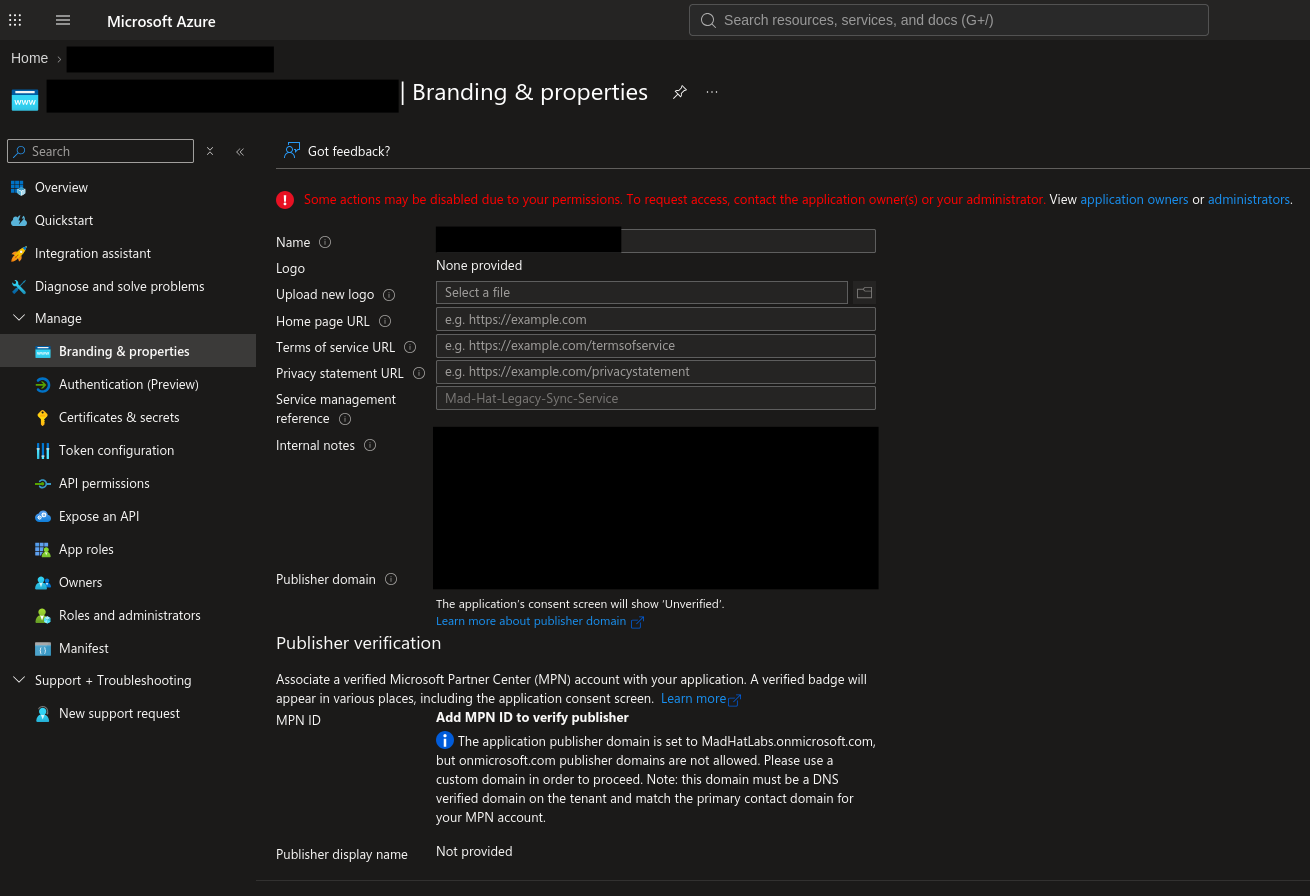
I opened Branding & properties on the legacy app and reviewed its internal notes. They connected the initial access to a phished employee whose MFA-satisfied session had been captured and replayed.
The account was not a Global Administrator. It did not need to be. It still owned the legacy application. Directory role and application ownership are different privilege paths, and a review limited to administrators could have come back perfectly clean while the useful authority sat quietly in the Owners list.
02 / ESCALATE
A client secret turned a compromised user into a privileged workload identity.
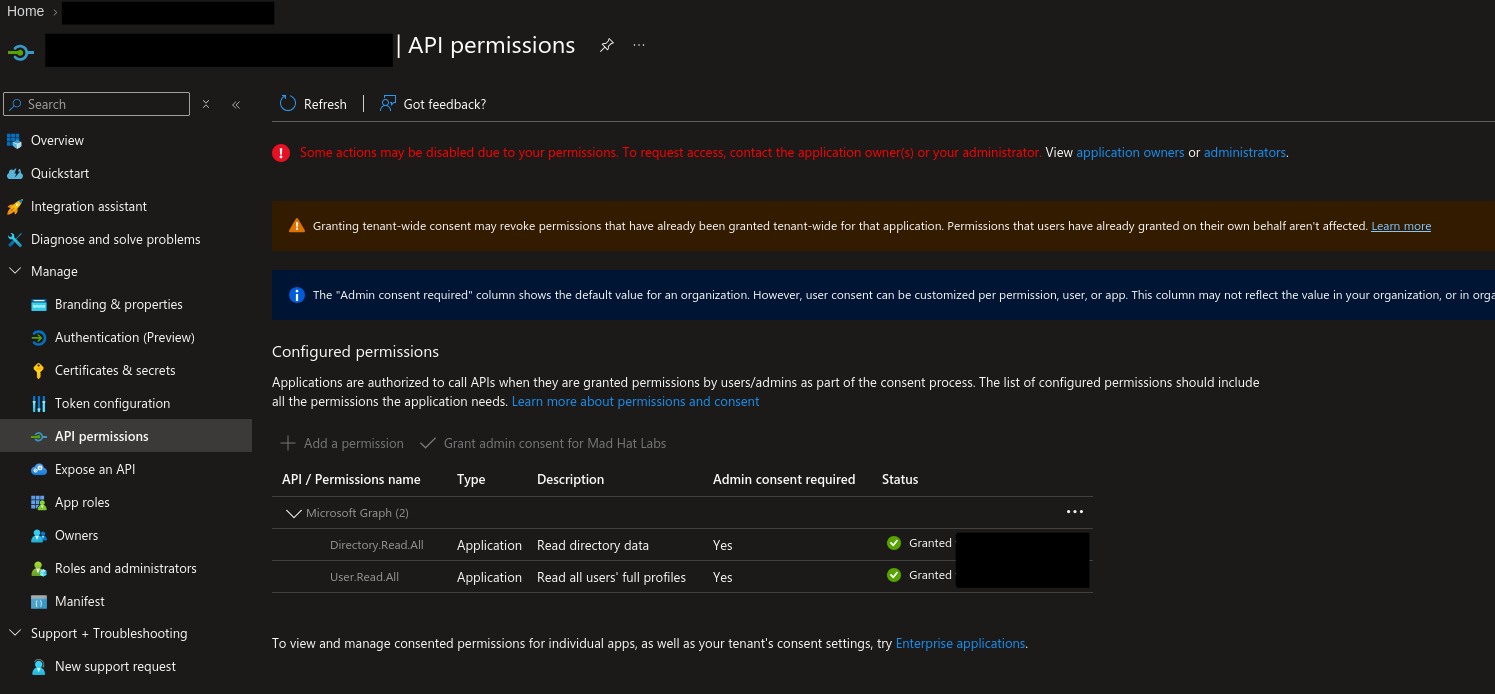
Under API permissions, I found live Microsoft Graph application permissions with admin consent, including Directory.Read.All and User.Read.All. Application permissions let the app act as itself; no human user participates in the client-credentials flow.
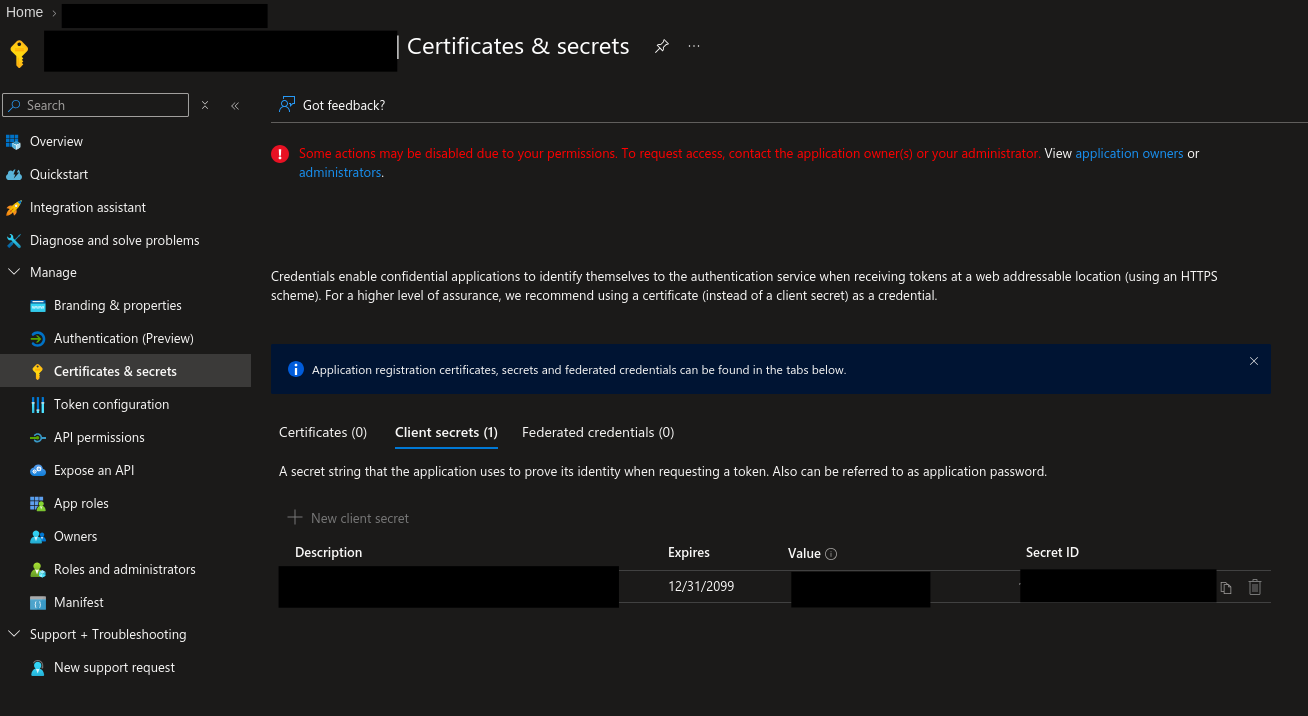
Under Certificates & secrets, I found the attacker's new client secret. Its expiration date was set in 2099. With that credential, the attacker could authenticate programmatically as the service principal and request app-only tokens without repeatedly signing in as the victim.
A secret expiring in 2099 is not a serious expiration policy. It is optimism formatted as a date.
03 / PIVOT
The first secret gave access. The second app made the access recoverable.
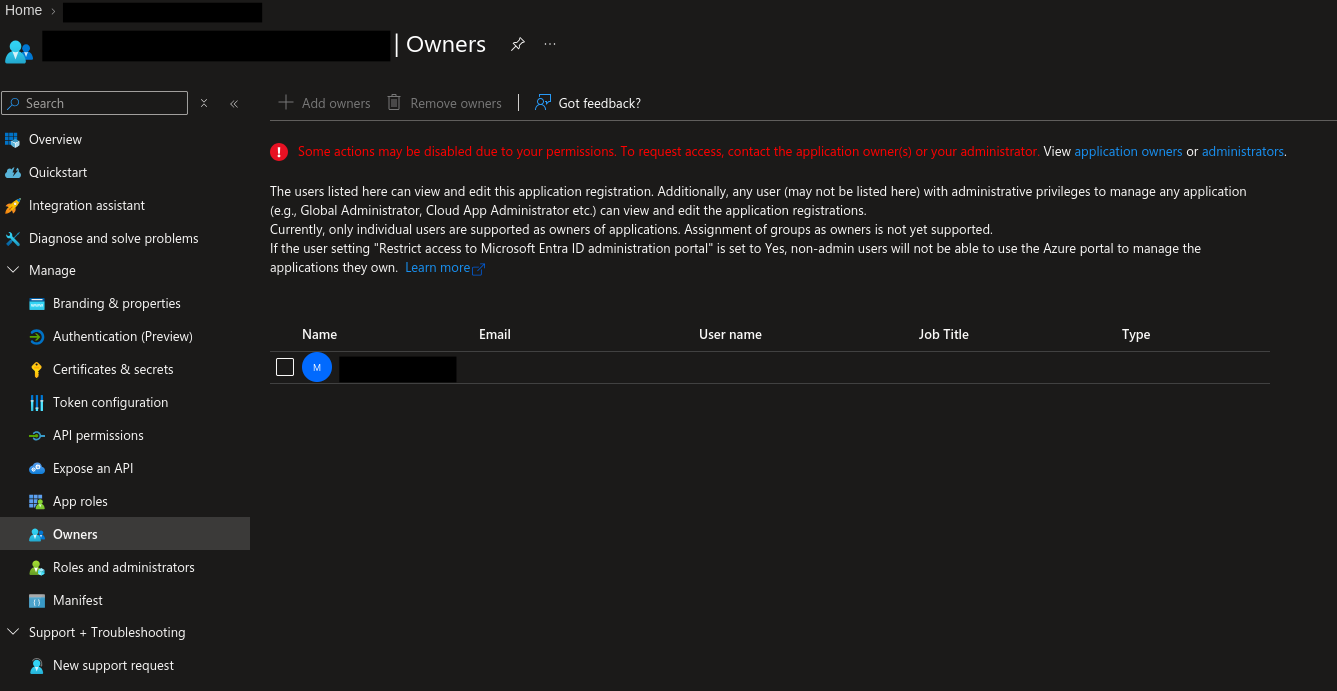
The legacy app's Owners list contained a service principal belonging to a second, attacker-created app registration. If a defender removed the original client secret, that rogue owner could create another credential.
Rotating one secret would solve the visible problem while leaving the authority that created it untouched. That is not remediation. It is mowing the weed and leaving the root.
The rogue app was effectively a shadow administrator over the legacy application. It would not appear in a directory-role review because the privilege lived in the relationship between the two application objects.
04 / PERSIST
The custom scope created a second authorization path.
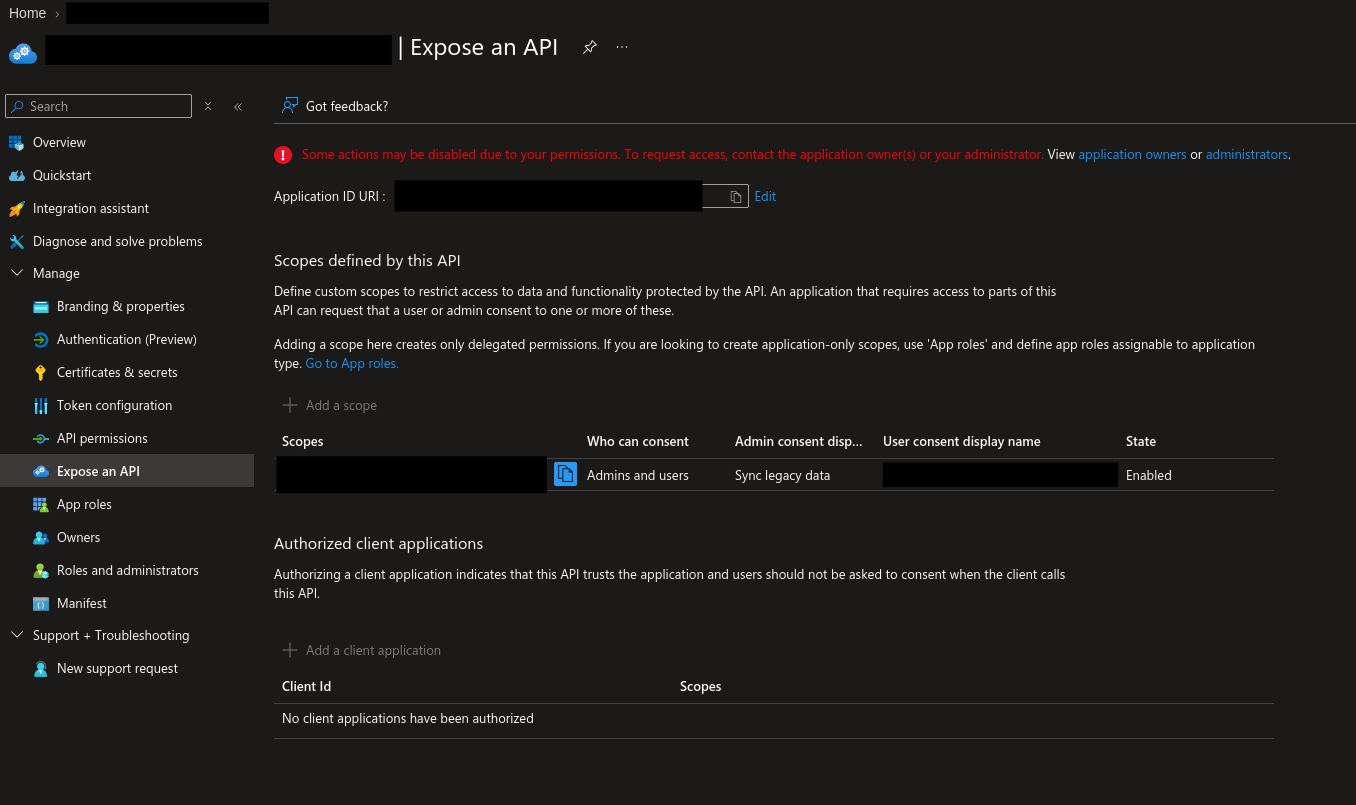
Under Expose an API, I found a custom delegated scope. This configuration made the legacy application a secured backend resource that another client could request permission to call. The attacker had already created that client.
The scope was not a magic token, and delegated access did not automatically inherit the legacy app's Graph application permissions. It created the doorway. The serious risk appears if the backend accepts the delegated request and then uses its own higher privilege without correctly checking the caller, user, tenant, scope, and requested action.
05 / LOOT
The counterfeit part was the request. Microsoft's consent machinery was genuine.
On the rogue app's Authentication blade, I found a redirect URI pointing to attacker-controlled infrastructure. The attacker combined the rogue client ID, that redirect URI, and the custom scope to create the consent-phishing URL.
A victim already signed in on a managed corporate device would see a real Microsoft consent prompt. Clicking Accept would send the authorization code to the attacker's registered redirect URI, where the rogue app could exchange it for a delegated token.
The attacker borrowed the credibility of the identity provider and invited the victim to authorize the theft personally. It is hard to design a more efficient division of labor.
06 / WHY THE NORMAL PLAYBOOK MISSES IT
The comforting fiction is that the password is the identity.
It is not. Modern identity is a collection of sessions, applications, service principals, credentials, ownership relationships, permissions, scopes, redirect URIs, and grants. Resetting one password addresses exactly one part of that system.
Consent phishing also avoids the friction of a fresh attacker login. The victim can already be authenticated on a trusted device with MFA and device requirements satisfied. When the victim approves delegated access, Entra creates an OAuth2PermissionGrant.
It addresses the compromised human credential, not the application's authorization.
It invalidates user sessions but leaves the consent object in the directory.
It strengthens authentication, not a permission already granted to an application.
Existing access tokens may remain valid until their normal expiration.
Reset the user. Revoke the sessions. Remove the app's access. Then verify that all three actions worked.
07 / THE CONFUSED DEPUTY
The trusted service was not malicious. It was useful.
The legacy connector is the deputy: a trusted application with legitimate authority. The rogue app is the caller. If the backend accepts the delegated request and performs a more privileged operation using its own application permissions without enforcing the correct authorization boundary, the attacker has persuaded the trusted service to exercise power for someone who should not possess it.
The deputy is not malicious. It is confused. Unfortunately, the directory does not award points for good intentions.
08 / FINDINGS
The most serious problem was durable control of a privileged application.
A secret valid into 2099 enabled app-only authentication to admin-consented Graph permissions.
The second service principal could recreate credentials after partial cleanup.
The custom scope, rogue client, and attacker redirect URI completed the authorization-code flow.
Directory-wide read capability increased the impact of credential or ownership compromise.
The compromised user could create attacker-controlled application infrastructure.
New credentials, owners, scopes, redirect URIs, and consent activity did not produce effective response.
09 / RESPONSE
Remove the credential, the authority that created it, and the consent that survived it.
- P0Contain the user and both applications
Reset the affected user, revoke sessions, remove the unauthorized secret, remove the rogue owner, remove the attacker redirect URI, and disable or restrict the affected service principals as appropriate.
- P0Revoke application authorization explicitly
Delete the malicious
OAuth2PermissionGrant. Remove the custom scope and any related pre-authorized clients or app-role assignments after checking legitimate dependencies. - P1Scope what the attacker did
Review user and service-principal sign-ins, directory audit logs, consent events, credential and owner changes, and data access associated with both applications.
- P1Reduce the blast radius
Validate every Graph application permission against a named owner and business purpose. Remove anything the connector does not actually need.
- P2Govern app creation and consent
Restrict default user app registration where practical, use an approved Application Developer process, and require appropriate review for user or admin consent.
- P2Monitor the application control plane
Alert on new credentials, unusual expiration dates, owner additions, app registrations, redirect URI changes, exposed scopes, app-role assignments, and delegated grants.
10 / WHAT SURPRISED ME
The long-lived secret was obvious. The ownership path was more interesting.
A standard user's stale owner assignment became control over a privileged workload identity. The attacker then used a second service principal to preserve that control. Nothing about the path required the compromised user to appear in a privileged directory role.
That changed how I think about identity reviews. It is not enough to ask who the administrators are. You also have to ask what they own, what owns what, which credentials those objects trust, and which permissions have already been granted.
Password reset, session revocation, and MFA enforcement sound decisive because they are decisive against a narrow class of problems. They do not erase application consent. The grant sits in the directory, perfectly valid and entirely indifferent to the confidence with which someone closes the incident ticket.